
Parts Lookup and Availability – Parts Department, Advisors, Technicians
Parts Lookup and Availability – Parts Department, Advisors, Technicians
Overview:
This feature will provide ease of use for any employee wishing to add a specific part to a
repair order line.
By typing into the Parts Description or Parts Number fields within Dealerlogix, a new Parts Lookup and
Availability menu will appear. This menu will suggest parts, found in the DMS, that are similar to what
the user has typed into the Parts Description or Parts Number field.
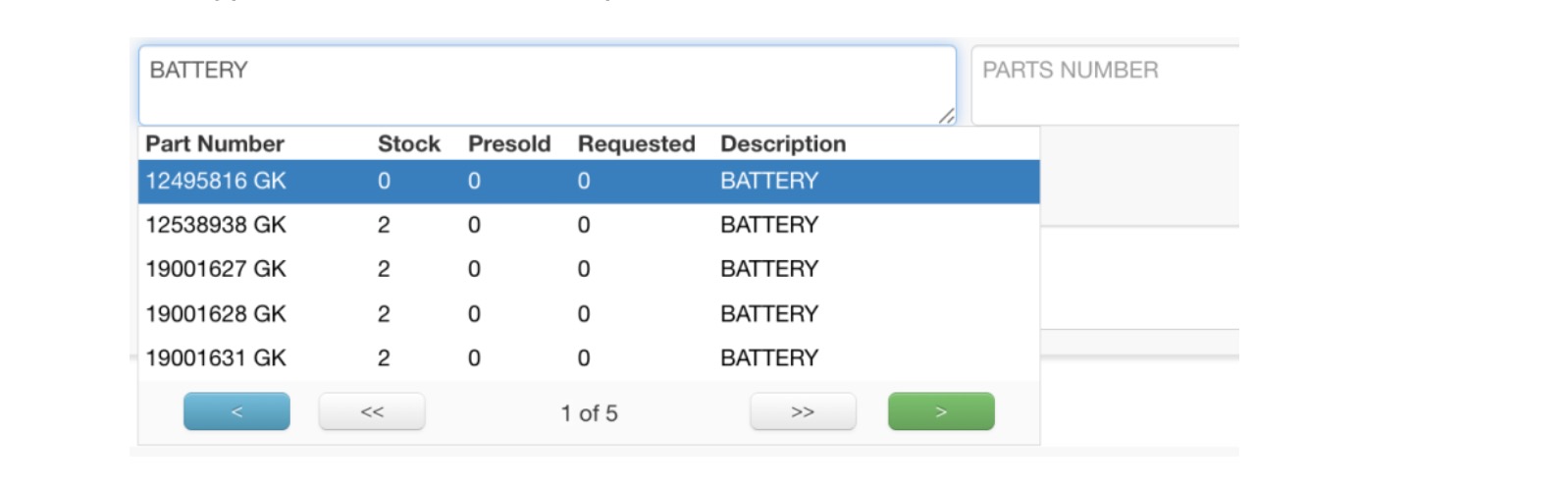
Selecting one of these parts will auto-fill the DMS provided description, part number, stock on hand, and price.

Parts Lookup and Availability will also provide a clear indicator when a specific part is marked as Out of Stock in the DMS.

Key Benefits
•Help maintain accurate inventory as work is approved and completed.
•Quickly identify synced, in-stock, parts in the DMS.
•Enhanced alerts when parts are entered that don’t match the DMS.